The best site I have found to determine the name of a specific guitar chord is to use Chord Namer on the JGuitar website. Every time I figure out a song and I can’t arrive at the correct name for a chord, I have found this site the simplest and most comprehensive to use.
When I want to determine the composition of a certain song, I just figure it out. It is just that easy for me. Upon listening to any song, I can figure the chord progressions in my head. Then I put it down in Word to use at a later time. The chord format I implement here is TAB (Guitar Tablature). This is pretty much the standard and easiest way to write/communicate songs to other players, just in case you didn’t know.
The chord(s) that I come up with for songs are always more complicated then what the general guitar player needs. So the chord names are much more complex then say for example: play a B chord here and then … Now this is how the chord namer works!
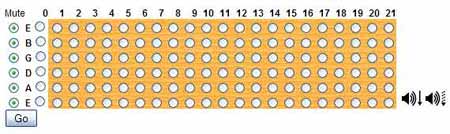
Now to get a better grasp of how to understand this screen, imagine that you are holding a guitar on your lap with the guitar in the playing position. Then to get a better look at the whole fretboard and to look at where you will be placing your fingers, you would pick up the bottom part of the guitar and bring it up towards your face. Got it?
Now to how the program works!
From left to right on this screen (see link above), Mute indicates the string that you WILL NOT be hitting. So at first glance, all the circles have this green dot in the center of them. This indicates that you WILL NOT be hitting ANY of these strings.
Right beside this, you will see letters and they represent the strings that you will hit. To the right of these letters, you will see circles with NO green dots in the middle. Click on the ones that YOU WILL BE USING!
Now you get to the part of the program where you tell it exactly WHERE you wish to put your fingers on the fretboard. The yellow section represents your fretboard. The numbers that you see directly above it represents the FRETS. Now you just move your mouse over the individual string and fret you will use and click it. A green dot will appear in the middle of the circle and represents your finger positioning.
With all this complete, you then hit the Go button and wait for the name of your chord to appear!
The chord namer generates many other chords names here, but for the general player just use the first chord at the top of the list. I pretty much only use this function on the site, but there are many more hidden treasures on here if you are a little more adventurous.
So give it a whirl, if your in trouble trying to find the name of a chord and get back to us at what you think of it. We’re all waiting for your results!
Keep on Jammin’

That is a really cool tool. I’m surprised nobody came up with that a long time ago. I especially like that it strums the chord and flat picks the chord.
One issue…every now and then it BLASTED distortion for a split second. Scared the you-know-what out of me. Might be something with my computer. Did anyone else experience this?
Hey Bendaroos, I just keep the volume down when using it. I’ve actually never turned on the volume, I’ll have to do that right now and see if it has the same effect on me, LOL!
Thanx for the comment man